I ran Prometheus + Grafana for two years on my self-hosted stack. It worked. But maintaining it was a part-time job I did not sign up for.
This is the story of how I replaced a 5-container monitoring stack with one container, and what I gained and lost in the process.
My Prometheus Stack
My monitoring setup looked like this:
services:
  prometheus:
    image: prom/prometheus:latest
    volumes:
      - ./prometheus.yml:/etc/prometheus/prometheus.yml
      - prometheus-data:/prometheus

  grafana:
    image: grafana/grafana:latest
    volumes:
      - grafana-data:/var/lib/grafana

  cadvisor:
    image: gcr.io/cadvisor/cadvisor:latest
    volumes:
      - /:/rootfs:ro
      - /var/run:/var/run:rw
      - /sys:/sys:ro
      - /var/lib/docker:/var/lib/docker:ro

  node-exporter:
    image: prom/node-exporter:latest
    volumes:
      - /proc:/host/proc:ro
      - /sys:/host/sys:ro

  alertmanager:
    image: prom/alertmanager:latest
    volumes:
      - ./alertmanager.yml:/etc/alertmanager/alertmanager.yml
Five containers. Three config files. ~600 MB of RAM at idle.
The Pain Points
1. Config file maintenance
Every time I added a new service, I had to:
- Add the service to
docker-compose.yml - Add a scrape target to
prometheus.yml - Create or update a Grafana dashboard
- Sometimes add alert rules to a separate file
Four files to update for one new service.
2. cAdvisor’s appetite
cAdvisor alone consumed 150-200 MB of RAM. On my 4 GB VPS, that was a significant chunk, just to expose container metrics that Prometheus could scrape.
3. Dashboard sprawl
After two years, I had 12 Grafana dashboards. Half of them were broken because I had renamed containers or changed labels. The other half showed data I never looked at.
4. PromQL fatigue
I am a developer, not an SRE. Writing PromQL queries like rate(container_cpu_usage_seconds_total{name="api"}[5m]) to answer “is my API using too much CPU?” felt like using a chainsaw to cut bread.
5. The monitoring stack itself
Twice in two years, my monitoring stack went down while my services were running fine. Once because Prometheus ran out of disk. Once because a Grafana plugin update broke a datasource.
Who monitors the monitoring?
The Migration
Step 1: Deploy Maintenant alongside Prometheus
services:
  maintenant:
    image: ghcr.io/kolapsis/maintenant:latest
    ports:
      - "8081:8080"
    volumes:
      - /var/run/docker.sock:/var/run/docker.sock:ro
      - /proc:/host/proc:ro
      - maintenant-data:/data
    environment:
      MAINTENANT_ADDR: "0.0.0.0:8080"
      MAINTENANT_DB: "/data/maintenant.db"
    restart: unless-stopped
I ran both stacks in parallel for two weeks. Maintenant on port 8081, Prometheus + Grafana on port 3000.
Step 2: Add Docker labels for endpoints
services:
  api:
    image: myapp:latest
    labels:
      maintenant.endpoint.http: "http://api:3000/health"
      maintenant.endpoint.interval: "15s"

  postgres:
    labels:
      maintenant.endpoint.tcp: "postgres:5432"
Step 3: Compare
After two weeks, I compared what each stack showed me:
| Question | Prometheus + Grafana | Maintenant |
|---|---|---|
| Are my containers running? | ✓ (via cAdvisor + custom dashboard) | ✓ (auto-discovered) |
| Is my API responding? | ✓ (via Blackbox Exporter, another container) | ✓ (Docker labels) |
| Are my SSL certs valid? | ✗ (I was checking manually) | ✓ (auto-detected) |
| Is my backup cron running? | ✗ (I had no monitoring for this) | ✓ (heartbeat system) |
| Which containers need updates? | ✗ | ✓ (OCI digest scan) |
| CPU/RAM per container? | ✓ | ✓ |
| Disk space? | ✓ | ✓ |
Maintenant covered everything I actually looked at in Grafana, plus SSL tracking, cron monitoring, and update detection that I did not have before.
Step 4: Remove Prometheus stack
docker compose stop prometheus grafana cadvisor node-exporter alertmanager
docker compose rm -f prometheus grafana cadvisor node-exporter alertmanager
Then I deleted prometheus.yml, alertmanager.yml, and the Grafana datasource configs.
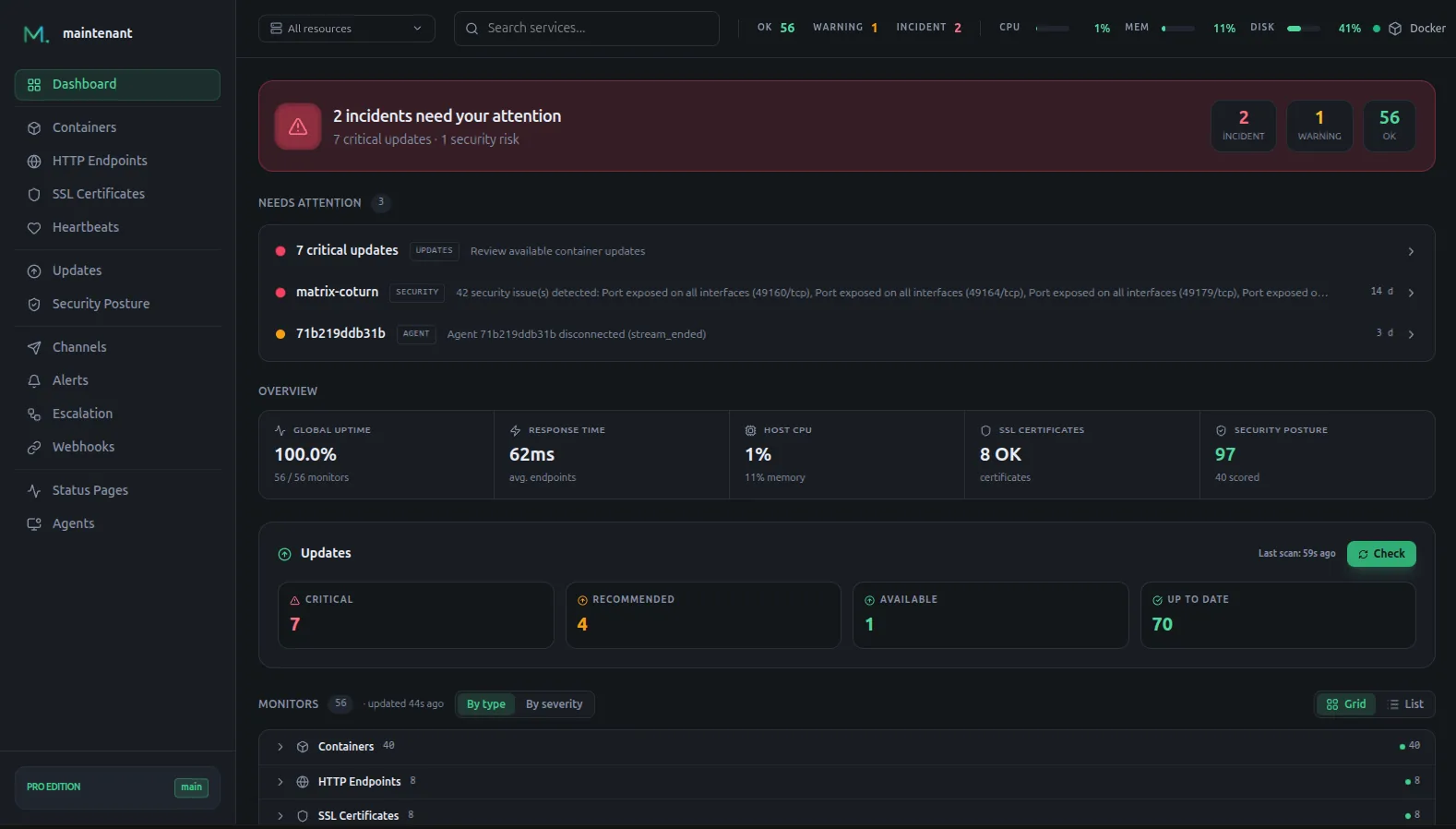
What I Gained
- 500+ MB of RAM back on my 4 GB VPS
- 3 config files deleted (prometheus.yml, alertmanager.yml, Grafana configs)
- 4 containers removed from my stack
- SSL monitoring I did not have before
- Cron job monitoring I did not have before
- Update detection I did not have before
- Zero maintenance: no more broken dashboards or stale scrape targets
What I Lost
- PromQL: I can no longer write ad-hoc queries to explore metrics
- Custom dashboards: no more building my own visualizations
- Per-second granularity: Maintenant collects every 10 seconds
- Historical data: I exported my Prometheus data but cannot query it in Maintenant
For my use case (a self-hosted stack of ~20 containers) none of these losses matter. I never used PromQL outside of copy-pasting from Stack Overflow. My custom dashboards were mostly broken. Per-second data was noise for my purposes.
Would I Go Back?
No. The operational overhead of maintaining 5 containers and 3 config files for monitoring was not worth it for a stack of my size. Maintenant gives me everything I actually need in one container with zero config.
If my stack grows to 200+ containers across multiple clusters, I might revisit Prometheus. But for now, one container is enough.
Try Maintenant: 30 seconds to install → · Compare editions → Read the full comparison →